


WindHub - Marine Weather
4.439.00 Reviews
App Specs
- Version
- 2.8.5
- Updated On
- License
- Free
- Downloads
- 100,000+
- Developer
- Windy Weather World Inc
- Categories
- Weather
- Platform
- Android
Screenshots

 Analysis by AppCompare
Ever felt like you’re at the mercy of Mother Nature when you’re out on the water? Whether you’re an avid sailor, a weekend kayaker, or just someone who loves a good day by the seaside, understanding the weather is crucial. That’s where WindHub - Marine Weather comes in. This app is your reliable buddy for all things wind and weather-related, tailored specifically for marine enthusiasts. Let’s dive into what makes this app a must-have for your next aquatic adventure.
The weather-checking routine it can simplify
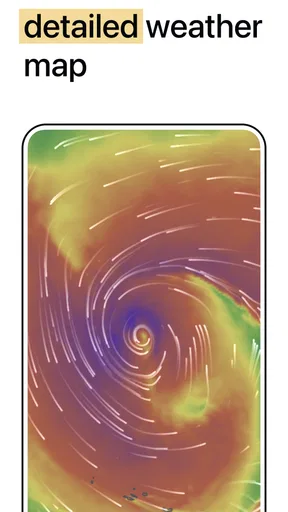
For a day on the water, checking a general forecast, then searching separately for wind, waves, rain, and pressure can become a slow and confusing routine. WindHub brings several marine-relevant views together on an animated map, including wind, swell, precipitation, isobars, and live stations. The practical benefit is not that a map makes a decision for you; it is that you can compare conditions in one place instead of piecing together several screens.
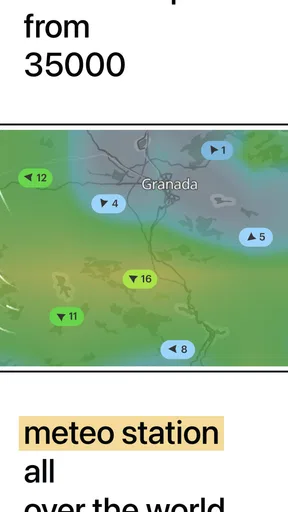
I find that especially useful when the plan is flexible. If I am choosing between a sheltered outing and an exposed stretch of coast, seeing how wind and swell sit across the area can help me decide what to investigate next. A broad map is good for spotting a pattern, while a nearby live station can offer a useful local reference. Neither replaces sound judgement, but together they can make the first check quicker.
Getting started with a useful map view
Picture this: you’re planning a sailing trip and need up-to-the-minute weather forecasts. WindHub delivers just that with an impressive range of features that cater to both amateur enthusiasts and seasoned sailors. From wind speed to wave height, this app has you covered with a user-friendly interface that’s easy to navigate.
When I first open a weather map, I try not to jump straight to a single point and treat it as the whole story. I look across the route or coastline first, then zoom in where the plan is most sensitive to changing conditions. WindHub’s animated display is useful for following how a weather pattern is moving, while the different map layers help me focus on one question at a time: Is the wind the main concern, is swell likely to affect the outing, or is precipitation approaching?
That order matters because a busy map can become harder to read if every layer competes for attention. A practical habit is to check the broad picture, switch to the layer most relevant to the activity, and then look at nearby live stations for context. If I am heading out with someone less experienced, I would also talk through the plan before leaving rather than relying on a quick glance once we are already underway.
Getting to Know WindHub
The app is a free weather utility from Windy Weather World Inc, with optional in-app purchases listed from $19.99 to $119.99 per item. It has an average rating of 4.5 from around 4.4 thousand ratings, and more than 100 thousand installs. Those figures suggest a well-used app, but they are not a substitute for deciding whether its map-first approach suits the way you plan trips.
Worth Reading Before You Choose

EA SPORTS FC Mobile 26 Is a Bigger Football Game, but It Takes Time

Flipboard Shows What News Apps Must Do Beyond the Feed

Switching to Android Auto Means Rethinking Your Driving Routine

Google Calendar Makes a Crowded Week Easier to Manage

Ludo King Makes the Most of the Minutes Between Plans

Baby Panda World Brings Quick Play to Modern Phones, but Its Game Library Feels Busy
It is rated for Everyone, was released on July 19, 2021, and its current version is 2.8.5, with Android 6.0 as the minimum operating system. I would treat those details as useful compatibility and product context rather than a promise that every feature will feel equally simple to every user. If you mainly want a quick daily temperature and a rain alert, a familiar general-purpose weather app may take less effort. WindHub makes more sense when marine conditions are part of the decision.
Dive Into the Features
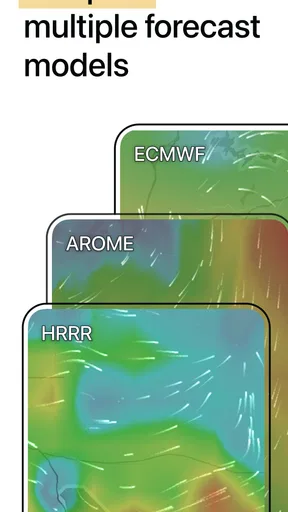
The standout feature of WindHub is its detailed wind forecasts. You get a comprehensive view of wind patterns with data sourced from leading meteorological providers. This isn’t just any weather app; it specializes in marine conditions, making it a go-to for anyone who spends time on or near the water.
The store summary also highlights swell, precipitation, isobars, and live stations, which gives the map more than one useful angle. One non-obvious way to use that range is to avoid treating each layer as an independent verdict. Wind and swell can affect the same outing in different ways, and a map lets me check whether the conditions that matter to my plan are concentrated in one area or spread along the coast. I still need to interpret what I see in light of the boat, route, and people involved.
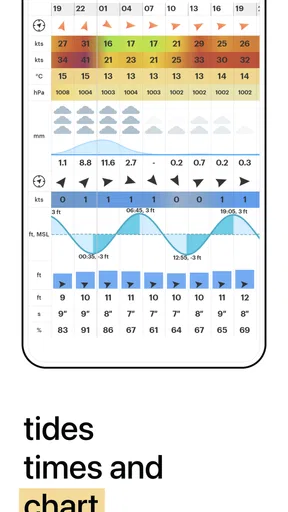
One of my favorite features is the live weather maps. You can zoom in on specific regions and see real-time changes, which is invaluable when planning your trip. Plus, the app integrates tide charts and wave forecasts, giving you a holistic view of what to expect.
For a more careful check, I would use the map to narrow down the location, inspect the most relevant conditions, and then compare the picture with a nearby station rather than assuming that one reading describes an entire bay or stretch of open water. Local geography can make conditions feel different from one place to another, so this extra comparison is a sensible habit, not needless fuss. If the forecast and what I can observe locally disagree, I would pause and reassess rather than letting a tidy display overrule caution.
Why It Stands Out
Let’s talk about the interface, shall we? Navigating through the app is a breeze (pun intended). The layout is intuitive, with a clean design that doesn’t overwhelm you with data. You can easily switch between different types of forecasts and customize your settings based on your needs.
The real trade-off is that a layered weather map asks for more attention than a simple forecast card. That is a strength for someone who wants to compare conditions spatially, but a drawback if all they need is a fast answer about whether to carry an umbrella. The animated presentation can help make movement easier to understand, yet it can also encourage a quick impression where a slower, layer-by-layer check would be wiser.
Compared with the usual general weather app, WindHub is better suited to asking marine questions, such as how wind and swell look around a route. A general app can be more convenient for household plans and everyday alerts; a dedicated marine view is more informative when conditions on the water are central. I would not replace every weather source with one specialist app. I would use WindHub for the marine picture and keep a simpler forecast handy for ordinary land-based planning.
Another useful workflow is to check the intended departure area and the destination separately before setting off. The conditions along the way may matter as much as those at either end. For a short kayak outing, that means not choosing a launch point solely because it looks calm on one small patch of the map. For a sailing plan, it means looking at the route as a whole and being willing to change the plan if the wider pattern gives me pause.
Real-World Application
Let me paint you a picture of how this app can be a lifesaver. Imagine you’re out sailing, and the skies start to darken. A quick check on WindHub shows you an incoming storm. With this information, you can decide whether to change course or head back to shore. It’s like having a meteorologist on board with you.
A more ordinary use happens before the trip, when a forecast is uncertain enough that I do not want to commit the whole day to one exposed destination. I can look at the map over breakfast, compare the area I hoped to visit with a more sheltered alternative, and decide whether it is worth going at all. That small change in routine can save a wasted drive or an uncomfortable launch. It does not mean the app can guarantee conditions later; it gives me a clearer basis for making a plan and checking it again closer to departure.
For a weekend kayaker, the useful question may be whether the route remains comfortable and manageable, not whether the weather is technically suitable for a larger vessel. For a sailor, the same wind map may be one part of a more involved route check. A fishing trip brings another set of priorities: timing, access, and the water conditions at the chosen spot. WindHub can help organize the weather side of those decisions, but it cannot choose a safe route or account for every personal skill and equipment difference.
For those who love fishing, knowing the tide and wave conditions is crucial. WindHub provides precise data that helps you pick the best spots and times, enhancing your chances of a successful catch.
In practice, I would treat any single forecast view as a planning aid, not a guarantee. Conditions can shift, and a map is only useful if I check it at a sensible time and stay alert to what is happening around me. A good routine is to review the map before leaving, make a conservative plan, and reconsider if the weather or local observations do not match expectations. That approach is more valuable than opening the app only after a trip has already become uncomfortable.
Where it helps, and where it may not
WindHub is a strong fit for people who regularly sail, kayak, fish, or spend time near the coast and want more than a general forecast. It is also useful for someone learning to read marine conditions, provided they are willing to move between layers and ask what each one means for the planned activity. The map encourages a more location-aware check than a single daily summary, which is exactly what I want when the destination matters.
I would skip it if I only wanted a quick temperature, a simple chance of rain, or a basic notification before walking to work. A map with several weather layers is not automatically better for those everyday questions; it may simply add steps. It is also not a substitute for training, local knowledge, official safety advice, or a decision to stay ashore when conditions feel beyond your comfort level.
One question people often have is whether they need to pay just to try it. The app itself is free, while in-app purchases are available at the listed range; I would start with the free experience and decide whether any paid option is worthwhile only after identifying a specific need. Another practical question is whether it suits a short outing as well as a long trip: its marine map can be useful for either, but the amount of detail only pays off if you are prepared to spend a little time interpreting it.
For anyone comparing it with a standard weather app, the clearest distinction is the emphasis. A general app is usually the quicker choice for routine land-based forecasts; WindHub is the more relevant tool when wind, swell, precipitation, isobars, and live stations need to be considered around a marine location. I would keep my expectations focused on that job rather than expect it to replace every forecast source or make a trip decision on my behalf.
Final Thoughts
In a world where the weather can be unpredictable, having a reliable source of information is invaluable. WindHub - Marine Weather combines accuracy with an easy-to-use interface, making it an essential tool for anyone who loves the water. Whether you’re planning a leisurely day at sea or a serious sailing expedition, this app ensures you’re well-prepared.
My recommendation is more specific: use it if checking marine conditions is a regular part of deciding where and when to go. The animated map and range of layers can reduce the time spent jumping among sources, but the payoff depends on making careful comparisons rather than trusting one glance. For someone who wants a very simple forecast, it may be more app than they need. For a water-loving user who values a clearer view of conditions around a planned outing, it is a useful place to start.
So next time you’re gearing up for a marine adventure, don’t leave port without WindHub. It’s the trusty sidekick you never knew you needed, providing peace of mind and helping you make the most of your time on the water.
Pros
- Accurate wind forecasts for sailors.
- Real-time weather map updates.
- Intuitive and user-friendly interface.
- Customizable notifications for alerts.
- Detailed marine charts included.
Cons
- Requires internet for live updates.
- Limited offline functionality.
- Premium features behind paywall.
- Occasional app crashes reported.
- Not optimized for older devices.
FAQs for WindHub - Marine Weather
What is WindHub - Marine Weather, and what features does it offer?
WindHub - Marine Weather is a comprehensive app designed for marine enthusiasts, providing accurate weather forecasts, wind patterns, and sea conditions. Key features include real-time updates, detailed maps, and customizable alerts for various weather conditions. It's ideal for sailors, surfers, and anyone needing precise marine weather information.
How accurate are the weather forecasts in WindHub - Marine Weather?
WindHub prides itself on delivering highly accurate weather forecasts by utilizing advanced meteorological models and data sources. The app updates forecasts regularly to ensure reliability, making it a trusted choice for planning marine activities. User reviews often highlight its precision in predicting wind speed, direction, and other vital weather parameters.
Is WindHub - Marine Weather user-friendly for beginners?
Yes, WindHub is designed with user-friendliness in mind. It features an intuitive interface that allows easy navigation through different sections, such as maps, forecasts, and alerts. Beginners can quickly grasp how to use the app, while advanced users will appreciate the depth of information available for detailed analysis.
Does WindHub - Marine Weather require an internet connection?
An internet connection is necessary for WindHub to provide up-to-date weather information and forecasts. The app relies on real-time data from various sources, which requires connectivity. Users planning to be offline should check forecasts in advance to ensure they have the latest information before setting out.
Are there any subscription fees or in-app purchases in WindHub - Marine Weather?
WindHub offers a free version with essential features available to all users. However, for more advanced functionalities and detailed forecasts, there may be options for in-app purchases or subscription plans. These enhancements can provide more comprehensive data and additional customization options for dedicated users.


